How to Build a Trading Journal Using Notion (2026 Guide)
Build a trading journal in Notion from scratch — the database properties, the R-multiple formulas, the views that make it useful, and where Notion runs out.
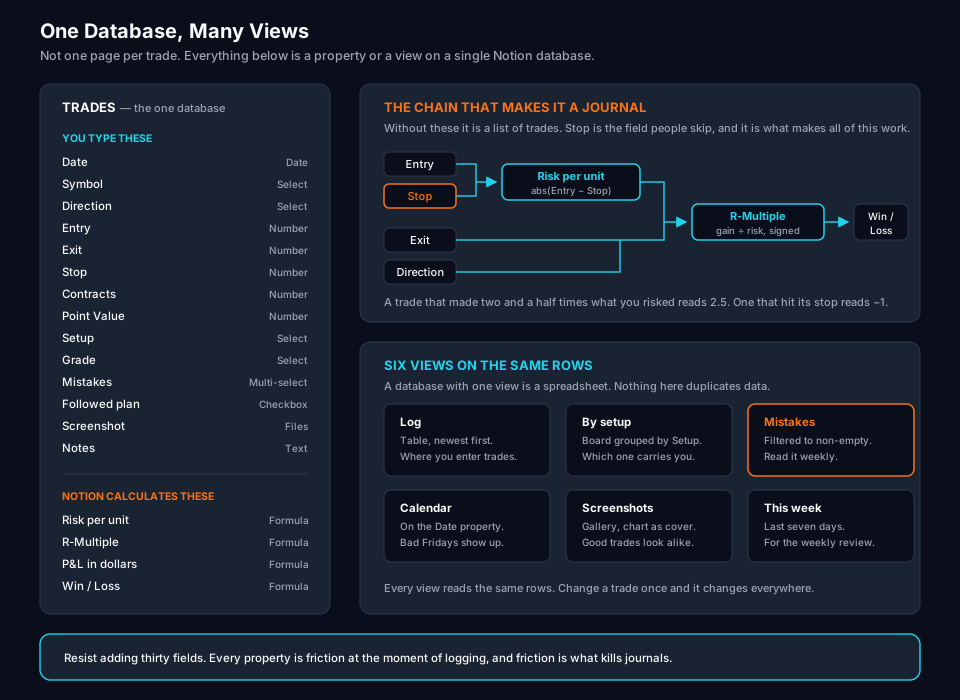
Notion is a genuinely good place to start a trading journal. It costs nothing, you can shape it exactly how you think, and unlike a spreadsheet it holds screenshots and written notes next to the numbers without turning into a mess.
It’s also the setup most traders abandon in about six weeks. Not because Notion is bad, but because they build it wrong — usually as a wall of text pages instead of a database — and it stops being something they can learn from.
This guide builds it as a database from the start, with the formulas that make the numbers work, and it’s honest at the end about where Notion stops being the right tool.
Start With a Database, Not Pages
The single most important decision: your journal is one database where each trade is a row, not a page per day full of paragraphs.
The reason is that you’re eventually going to ask questions like “how does my breakout setup perform on Mondays” or “what’s my average R when I take a trade before 10am.” A database answers those with a filter. A pile of daily notes doesn’t answer them at all.
Create a new page, type /table, and choose Table view — full page. That’s your journal.
Each row is one trade. Each column is one property. Everything else in this guide is configuring those columns.
The Properties You Actually Need
Resist the urge to add thirty fields. Every field you add is friction at the moment of logging, and friction is what kills journals. Start with these.
Date — Date type. Enable the time field if you want to analyze time of day.
Symbol — Select type. Create an option for each instrument you trade.
Direction — Select type. Two options: Long, Short.
Entry — Number type, formatted to the decimals your instrument uses.
Exit — Number.
Stop — Number. This is the stop you actually placed when you entered, not where you wished you’d put it. This field is what makes R-multiple possible, and it’s the one people skip.
Contracts or Shares — Number. Position size.
Setup — Select type. Name your setups and use the same names every time. Consistency here is what makes the data worth anything later.
Grade — Select type: A, B, C. Not the outcome — the execution. Did you follow your plan? A well-executed loss is an A. A sloppy win is a C.
Mistakes — Multi-select. Options like: chased entry, moved stop, sized too big, no setup, revenge trade, exited early. This becomes the most valuable column in your journal within about two months.
Screenshot — Files & media. Chart at entry, chart at exit.
Notes — Text. What you saw, why you took it.
The Formulas That Make It Work
This is where most Notion journals fall down. Without these, you have a list; with them, you have a journal.
Risk per unit — Number formula. How far away your stop was.
abs(prop("Entry") - prop("Stop"))
R-multiple — the core metric. This handles both directions:
if(
  prop("Direction") == "Long",
  (prop("Exit") - prop("Entry")) / abs(prop("Entry") - prop("Stop")),
  (prop("Entry") - prop("Exit")) / abs(prop("Entry") - prop("Stop"))
)
Set this to show two decimal places. A trade that made two and a half times what you risked shows as 2.5. One that hit your stop shows as -1.
P&L in dollars — for futures, where each point has a fixed value, add a Point Value number property (50 for ES, 20 for NQ, 2 for MES, 5 for MNQ) and use:
if(
  prop("Direction") == "Long",
  (prop("Exit") - prop("Entry")) * prop("Contracts") * prop("Point Value"),
  (prop("Entry") - prop("Exit")) * prop("Contracts") * prop("Point Value")
)
For stocks, drop the point value and multiply by shares.
Win or loss — useful for filtering:
if(prop("R-Multiple") > 0, "Win", "Loss")
Followed plan — a checkbox you tick honestly. Pair it with Grade. Over time, comparing your R on plan-followed trades against plan-broken trades is often the single most confronting number in the journal.
Views That Make You Actually Use It
A database with one view is a spreadsheet. Views are where Notion earns its place.
Log — the default table, sorted by date descending. Your daily entry point.
By setup — Board view grouped by Setup. Instantly shows which of your setups is carrying the account and which one you keep trading out of boredom.
Mistakes — Table filtered to where Mistakes is not empty. Read this once a week. It’s uncomfortable and it’s the point.
Calendar — Calendar view on the Date property. Reveals patterns you won’t see in a list, like a run of bad Fridays or overtrading after a big win.
Screenshots — Gallery view with the Screenshot property as the card preview. Scrolling your entries as images is a surprisingly effective way to spot that your best trades all look alike.
This week — filtered to the last seven days, for the weekly review.
Add a Weekly Review
The journal is data collection. The review is where the value is, and without it you’re just doing bookkeeping.
Make a second database — call it Reviews — with one row per week and these properties: Week (date), Total R, Win rate, Best trade, Worst trade, and three text fields: What worked, What didn’t, One change for next week.
Fill it in every Sunday. Twenty minutes.
The “one change” field matters more than the rest combined. One change, tested for a week, measured against the R column. That’s a feedback loop, which is the entire reason to keep a journal.
Making Entry Fast Enough That You’ll Do It
The journal you actually fill in beats the elegant one you abandon.
Build a template. In your database, open the template menu and create a “New Trade” template with Direction, Grade, and any defaults pre-filled. One click instead of twelve.
Use the mobile app for capture, desktop for review. Log the trade on your phone while it’s fresh — symbol, entry, exit, stop, one sentence of why. Fill in the rest at the end of the day.
Log the reason before the outcome. The most useful sentence in your journal is the one you write at entry, before you know how it turns out. Written afterward, it’s a rationalization.
Keep it under sixty seconds per trade. If logging takes longer than that, cut fields until it doesn’t.
Where Notion Runs Out
Honest limits, because you’ll hit them and it’s better to know in advance.
No broker import. Every trade is typed in by hand. For two or three trades a week that’s fine. At fifteen trades a day it’s an unpaid part-time job, and it’s the reason most active traders quit their Notion journal.
No MAE or MFE. You can’t see how far a trade went against you before it worked, or how much you left on the table. Those two numbers drive most stop and target improvements, and Notion has no way to capture them without you reading them off a chart by hand.
Statistics stop at basic. Rollups will give you sums and averages. They won’t give you expectancy by setup by time of day, distribution curves, or drawdown analysis.
Formulas get brittle. Scaling in and out breaks the single-entry, single-exit model completely. Most people end up logging an average price, which quietly corrupts the R data they’re relying on.
Nothing enforces anything. Notion will happily let you skip the Stop field, and that’s exactly the field you’ll skip on the trades you’re least proud of — which are the ones you most needed to record.
Is Notion Enough for You?
Notion is a good fit if you take a handful of trades a week, you’re swing trading, you value written reflection as much as statistics, and you want something free and flexible that you shape yourself.
You’ll outgrow it if you’re taking multiple trades a day, you need broker import, you want MAE and MFE, or you’ve noticed you’re skipping days because the entry friction wore you down.
That last one is the real test. Journals fail from friction, not from missing features. If you’re still filling it in after three months, Notion is doing its job.
If you’ve hit the wall, that’s the gap TradingEdge Journal was built for — automatic import instead of manual entry, MAE and MFE captured per trade, and statistics that go past averages, all stored locally on your Mac rather than on someone’s server. It’s the same discipline this guide is teaching, without the typing.
Either way, the habit is worth more than the tool. Start in Notion this week rather than researching the perfect journal for another month.
Bottom Line
Build it as a database, not a page of notes. Record the stop you actually placed, because R-multiple is the metric that makes everything else comparable. Add the Mistakes multi-select and read it weekly.
Then do the Sunday review and pick one change. That loop — log, review, change one thing, measure — is what a trading journal is for, and it works in Notion just as well as anywhere else, right up until the typing gets in the way.
Common Questions
Is Notion good for a trading journal?
Notion works well for a manual trading journal, especially for swing traders and anyone taking a handful of trades a week. It handles structured trade data, screenshots, and written review notes in one place at no cost. It struggles with high trade volume and has no broker import, so day traders taking many trades per session usually outgrow it.
Is Notion free for trading journals?
Yes. Notion's free personal plan allows unlimited pages and database entries for individual use, which is more than enough for a trading journal. You only need a paid plan for team features you won't use for this.
Can Notion import trades from my broker automatically?
No. Notion has no broker integration. Every trade is entered by hand, or imported through a CSV upload that you have to format and repeat manually. This is the main practical limitation of using Notion as a trading journal.
What should a trading journal track?
At minimum: date, symbol, direction, entry, exit, stop, position size, and the resulting R-multiple. Beyond the numbers, track the setup name and your reason for taking the trade, since that is what turns a log into something you can actually learn from.
What is an R-multiple?
An R-multiple expresses a trade's result as a ratio of the amount you risked. If you risked $100 and made $250, that's +2.5R. Tracking in R rather than dollars lets you compare trades across different position sizes and account balances.